
Welcome to DrawMyEA Templates
Turn ideas into strategies with ready-made templates
Why start from scratch when you can explore proven trading logic?
Our template library is designed to help you:

Learn Faster
See how flowchart-based EAs are structured and understand trading automation step by step.

Experiment Safely
Test strategies without coding, and adapt them to your own style.

Get Inspired
Browse creative setups that spark new ideas for your trading journey.

Save Time
Skip the blank canvas and jump straight into customizing strategies that already work.
Kickstart Your Strategy with a Ready-to-Use Template
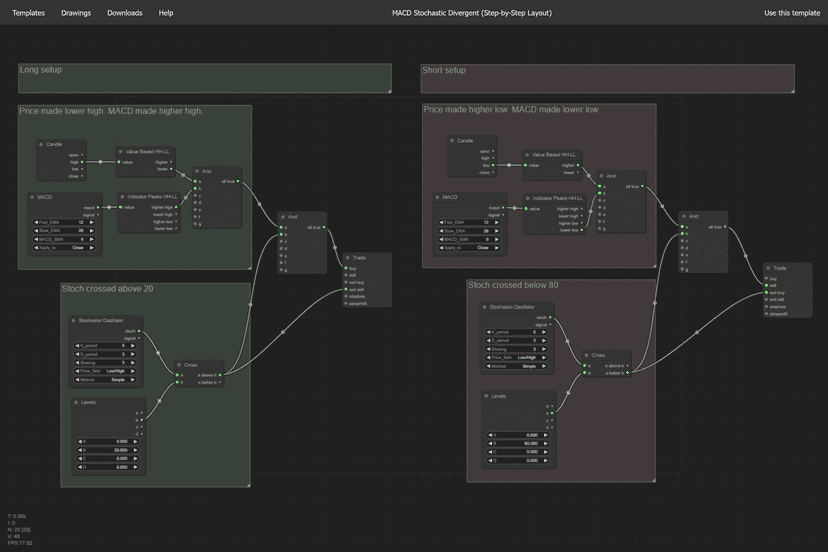
MACD Stochastic Divergent
(Step-by-Step Layout)
- This template shows the MACD divergence strategy in a flowchart where each node is drawn separately.
- It's designed to help you practice composing a full drawing from scratch, with every piece laid out clearly.
- Great for learning how to structure your chart. You'll see how the logic unfolds node by node.
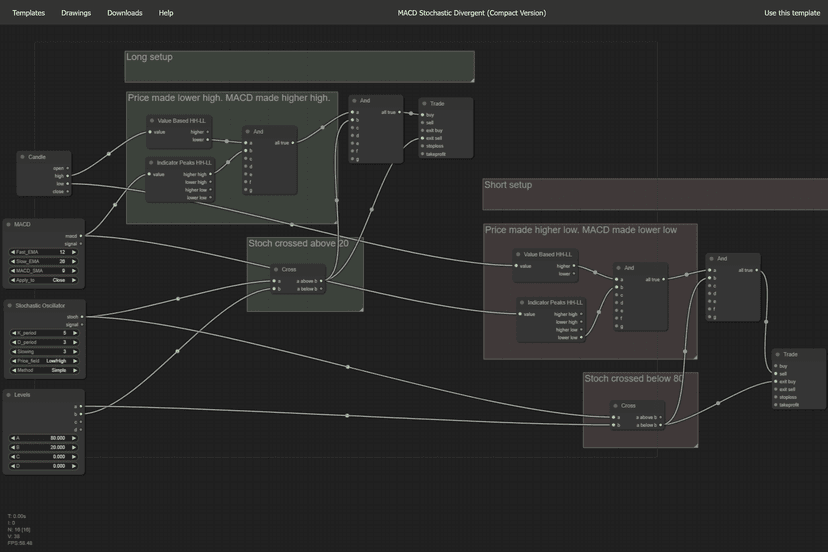
MACD Stochastic Divergent
(Compact Version)
- This template uses shared nodes to represent repeated logic, keeping the drawing compact.
- It's the same MACD divergence strategy, but composed in a way that reduces node count and speeds up execution.
- Perfect if you want to learn how to simplify your drawings while still capturing the full strategy.
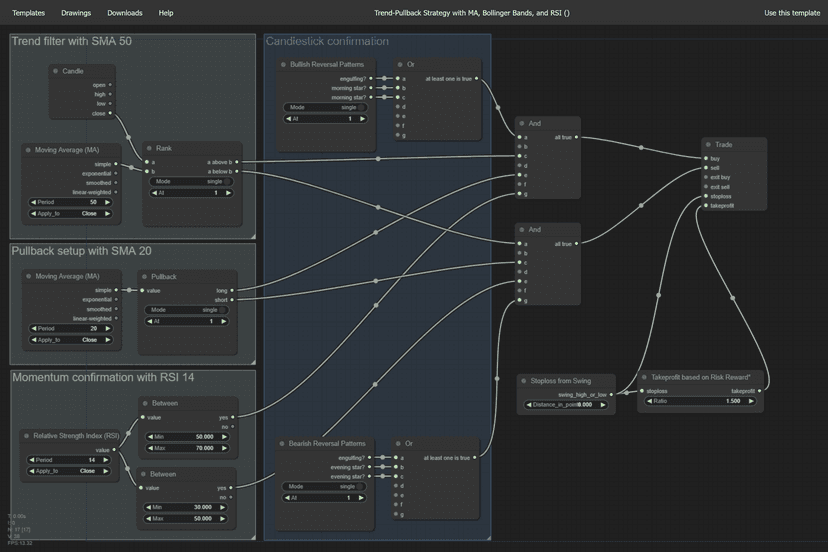
Trend-Pullback Strategy with MA, Bollinger Bands, and RSI
- This strategy combines 3 indicators to trade in the direction of the prevailing trend.
- MA acts as a filter to ensure trades align with the broader market direction.
- Bollinger Bands highlight pullbacks to the middle band, offering low-risk entry points instead of chasing price.
- RSI confirms momentum strength, ensuring entries are supported by underlying buying or selling pressure.
- Candlestick patterns such as engulfing or hammer formations provide final confirmation before entry.
- Stop losses are placed just beyond the most recent swing high/low, while profits are taken at a fixed risk-reward ratio or by trailing along the opposite Bollinger Band.
- This approach is simple, popular, and effective because it balances trend-following discipline with precise timing on pullbacks, reducing false signals and improving trade consistency.
Ready to dive in?
Every template is built to be beginner-friendly yet powerful enough for advanced traders.
Think of this page as your launchpad into algorithmic trading.
Explore, remix, and make each strategy your own.
No credit card required · 5 free credits daily
Frequently Ask Questions
Does it work with MT4 or MT5?
Once your strategy is ready, you can export a compiled .ex5 expert advisor file that's ready to use in MT5 right away.

How do I export my expert advisor?
No compiling, no MetaEditor, just drop the file into your MetaTrader 5 Experts folder and start testing or trading.
Will my strategies be private?
Can I build complex strategies?
It's a great starting point for both simple and moderately advanced ideas.
Note: for the moment DrawMyEA is designed for single-shot execution and does not support averaging or martingale approaches.
What are the supported indicators?
- Average Directional Movement Index (ADX)
- Bollinger Bands
- Ichimoku Kinko Hyo
- Moving Average (Classic)
- Moving Average
- MACD
- Moving Average of Oscilator (OsMA)
- Relative Strength Index (RSI)
- Stochastic Oscillator
- Volumes
Our goal is to eventually support all built-in MetaTrader indicators, with support for custom indicators planned for the future. The following are currently in the pipeline:
- Accelerator Oscillator (AC)
- Accumulation/Distribution (AD)
- Average Directional Movement Index (ADX Wilder)
- Adaptive Moving Average (AMA)
- Awesome Oscillator (AO)
- Average True Range (ATR)
- Alligator
- Market Facilitation Index (BWMFI)
- Bears Power
- Bulls Power
- Commodity Channel Index (CCI)
- Chaikin Oscillator (CHO)
- Double Exponential Moving Average (DEMA)
- Envelopes
- Fractal Adaptive Moving Average (FRAMA)
- Force Index
- Fractals
- Gator Oscillator
- Money Flow Index (MFI)
- Momentum
- On Balance Volume (OBV)
- Relative Vigor Index (RVI)
- Parabolic SAR
- Standard Deviation (StdDev)
- Triple Exponential Moving Average (TEMA)
- Triple Exponential Average (TRIX)
- Variable Index Dynamic Average (VIDYA)
- Williams' Percent Range (WPR)